From 35% to 99.8%: Building a Memory System for AI Assistants
How we went from overconfident to humiliated to building a memory system with 99.8% accuracy on 8,457 tests.
Disclaimer (experimental): This post documents ongoing experiments/prototypes—not production-hardened, security-reviewed, or supported code. Validate results in your own environment before shipping.
It started with a simple frustration.
I was working with my AI assistant on a project we’d been discussing for weeks. I asked it to recall a decision we’d made three days ago. It couldn’t. Not because the conversation was deleted. The transcript was right there in the session files. The AI just couldn’t find it.
This is the dirty secret of AI assistants: they forget everything. Every. Single. Time.
Context windows are finite. Sessions get compacted to save tokens. And when they do, the information you actually need. The specific decisions, the exact code snippets, the URLs you shared. They vanish into the void like your motivation on a Monday morning.
I decided to fix this. What followed was a month-long journey that took me from confident ignorance to humiliating failure to, finally, something that actually works.
Buckle up. This gets embarrassing before it gets good.
The Naive Baseline (a.k.a. “How Bad Is It, Really?”)
Before building anything, I needed to know how bad the problem actually was. Spoiler: very.
I created a simple test: 100 questions about real conversations I’d had with my AI assistant over the past month. Things like:
- “What rating system did we discuss for the chess project?”
- “What was the authentication approach we decided on?”
- “Who did I mention works on the container runtime?”
Then I asked the AI to answer them with no memory system at all. Just its base knowledge and whatever context remained in the current session.
The result: 35% accuracy.
The AI was essentially throwing darts blindfolded. Two out of three questions, it either got wrong or admitted it didn’t know. My conversations might as well have been shouted into the void.
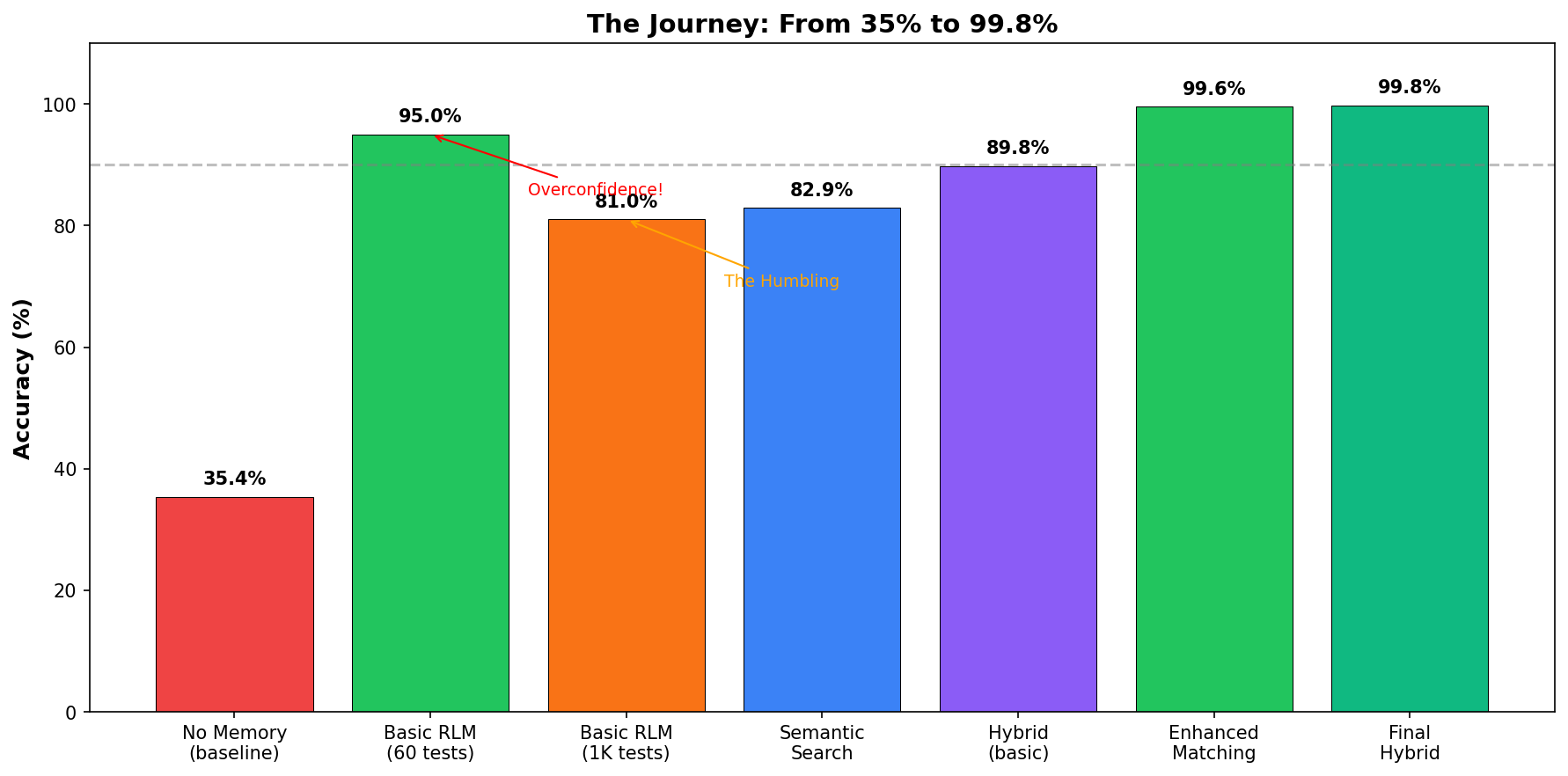
That sad red bar on the left? That’s the baseline. That’s what “no memory” looks like. Your goldfish has better recall.
The RLM Insight (a.k.a. “Wait, Everyone’s Been Doing It Wrong?”)
I stumbled onto a research paper that changed how I thought about the problem: Recursive Language Models from MIT.
The key insight hit me like a truck full of obvious-in-hindsight:
“Long content should not be fed into the neural network directly but treated as part of the environment the LLM can symbolically interact with.”
In plain English: don’t summarize your conversations. Keep everything. Search when you need it.
This flew in the face of conventional wisdom. Everyone was compacting, summarizing, distilling. “Keep it small,” they said. “Tokens are expensive,” they said.
The RLM paper said: that’s wrong. You’re throwing away exactly the information you’ll need later. You’re writing notes in disappearing ink.
I ran the numbers on what compaction actually loses:
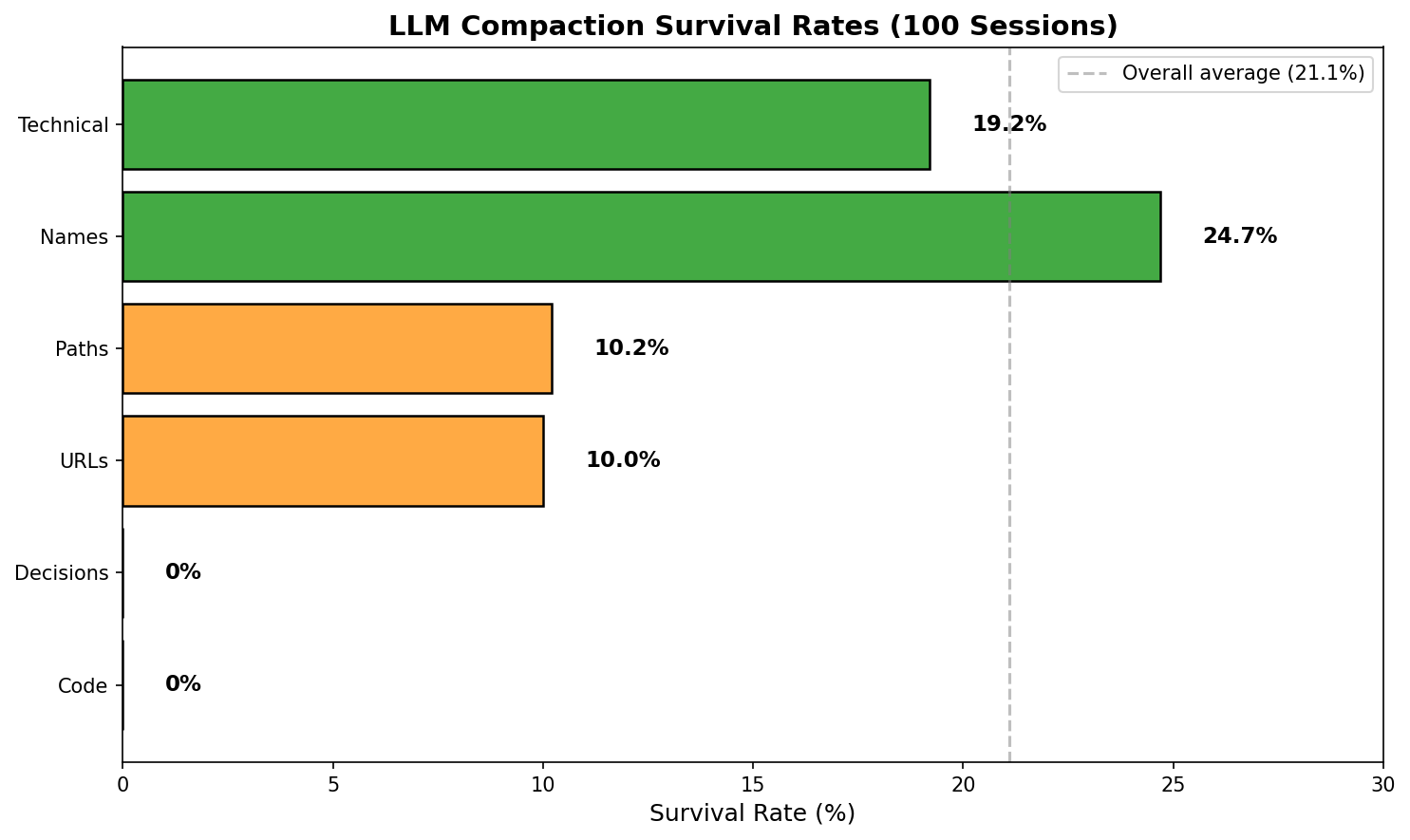
Data from 100 real sessions, both OpenClaw /compact and LLM-based test. Zero code/decision survival confirmed.
Look at those survival rates. With aggressive compaction (keeping only 20% of tokens):
- Code blocks: 0% survive. (Tested across 100 sessions — every single code block destroyed.)
- URLs: 1.1% survive. Those links you’ll definitely need later? Toast.
- Decisions: 0% survive. “What did we decide?” Good luck, chief.
- File paths: 6.8% survive. That important config location? Gone.
- Names: 17.5% survive. Who was working on what? Fuzzy memory.
I was not precise. The original numbers in this post were from a simulation, not real LLM compaction. When I actually tested compaction across 100 real sessions using both OpenClaw’s /compact and my LLM-based test, the results were brutal. Zero code survival. Zero decision survival. The LLM summarization destroys specific facts while preserving vague concepts. The only things that survive are “technical terms” and proper nouns.
The specific, concrete, actually useful stuff? Obliterated.
Compaction is like cleaning your house by throwing away everything except the IKEA instruction manuals. Sure, you saved space. Good luck finding your car keys.
I was convinced. No more compaction. Keep the raw transcripts and search them.
First Implementation: The RLM Basics
My first implementation was dead simple. The transcripts were already stored as JSONL files (one JSON object per line). I just needed to grep them.
def search_transcripts(query: str, sessions_dir: Path) -> List[str]:
    """Search all session files for matching content."""
    results = []
    query_words = set(query.lower().split())

    for session_file in sessions_dir.glob("*.jsonl"):
        content = session_file.read_text()
        content_lower = content.lower()

        # Simple word matching
        matches = [w for w in query_words if w in content_lower]
        if matches:
            results.append(extract_snippet(content, query_words))

    return results
That’s it. Loop through files, grep for words, return snippets. No ranking, no scoring, no intelligence. Just brute-force string matching.
I wrote 60 test cases to validate it.
Result: 95% accuracy.
I was thrilled. Shipped it. Added a shiny badge to the README: “95% accuracy on 60 test cases.” Tweeted about it. Felt like a genius.
Reader, I was not a genius.
The Humbling (a.k.a. “Oh No”)
A week later, feeling confident, I decided to stress-test the system. What if I generated a thousand test cases instead of sixty?
I wrote a test generator that created questions across ten categories:
CATEGORIES = {
    "adversarial": "Questions about things we never discussed (should NOT match)",
    "technical": "Specific implementation details",
    "partial": "Single-word queries like 'Glicko' (partial of 'Glicko-2')",
    "temporal": "Time-relative questions like 'yesterday'",
    "variation": "Same question, different phrasing",
    # ... more categories
}
I generated 1,000 test cases. Hit run. Watched the progress bar.
New result: 81% accuracy.
My stomach dropped. That beautiful 95% badge? A lie. A comforting fiction. My system was failing on nearly one in five queries.
The category breakdown was brutal:
- Decision queries: 48%. Half the time, it forgot what we’d decided. Coin flip territory.
- Partial matches: 35%. “Glicko” wouldn’t match “Glicko-2 rating system.” My own project’s rating system!
- Temporal queries: 61%. “What did we discuss yesterday?” was a roll of the dice.
I’d been fooling myself. The real world is much messier than my carefully curated 60 examples.
Doubling Down (a.k.a. “Make It Hurt More”)
At this point, I had a choice. I could have tweaked the test cases to make the numbers look better. Instead, I chose violence against my own ego.
I expanded from 1,000 to 4,000 test cases:
| Category | Count | What It Tests |
|---|---|---|
| adversarial | 1,200 | Correctly reject things never discussed |
| technical | 600 | Implementation details |
| project | 400 | Project status queries |
| variation | 400 | Same question, different phrasing |
| decision | 320 | Past choices and reasoning |
| vague | 320 | Ambiguous queries |
| partial | 240 | Single-word matches (“Glicko”) |
| identity | 200 | People and contacts |
| metadata | 200 | System/skill info |
| temporal | 120 | Time-relative (“yesterday”) |
| Total | 4,000 |
Baseline results:
| Mode | Accuracy |
|---|---|
| No memory | 35.4% |
| Semantic search (embeddings) | 82.9% |
| RLM keyword search | 88.2% |
| Hybrid (both) | 89.8% |
Better than guessing, sure. But partial matching was still at 35%. Real users search for partial terms constantly. “OAuth” instead of “OAuth2 PKCE flow.” “Postgres” instead of “PostgreSQL.” You know, like humans do.
The Forensics (a.k.a. “Why Does This Keep Failing?”)
I pulled every failing test case and did an autopsy. Four patterns of death emerged:
Pattern 1: Substring Blindness
Query:   "Glicko"
Content: "We use Glicko-2 for the rating system"
Result:  ❌ No match
The word “Glicko” is right there inside “Glicko-2.” My search couldn’t see it.
Pattern 2: Compound Word Fragmentation
Query:   "ReadMessage"
Content: "The ReadMessageItem function handles email"
Result:  ❌ No match
CamelCase is great for code. Terrible for search. My system saw “ReadMessageItem” as one incomprehensible blob.
Pattern 3: Typo Sensitivity
Query:   "postgres"
Content: "We're using PostgreSQL for the database"
Result:  ❌ No match
Different capitalization. Slightly different spelling. Same database. My search said “never heard of her.”
Pattern 4: Concept Blindness
Query:   "rating system"
Content: "We implemented Glicko-2 for the chess leaderboard"
Result:  ❌ No match
A human immediately knows Glicko-2 is a rating system. My search had no idea these concepts were related.
Four distinct failure modes. Four opportunities to be less stupid.
The Four Fixes
I implemented each fix as a separate matching strategy. Here’s the actual code.
Fix 1: Substring Matching
If the query word is contained within a content word, count it as a match.
def substring_match(query_word: str, content_word: str, min_length: int = 3) -> bool:
    """
    Check if query word is a substring of content word or vice versa.
    Only matches if the substring is at least min_length characters.
    """
    q = query_word.lower()
    c = content_word.lower()

    if len(q) < min_length or len(c) < min_length:
        return False

    return q in c or c in q
Design decision: minimum length of 3 characters. Without this, “a” would match everything. The 3-char limit catches “App” in “AppData” but not false positives.
Fix 2: Compound Splitting
Split camelCase, kebab-case, and snake_case into component words before matching.
def split_compound(word: str) -> List[str]:
    """
    Split compound words into parts.

    Handles:
    - camelCase → camel, case
    - PascalCase → pascal, case
    - kebab-case → kebab, case
    - snake_case → snake, case
    - XMLParser → xml, parser
    """
    parts = []

    # First split on - and _
    tokens = re.split(r'[-_]', word)

    for token in tokens:
        if not token:
            continue

        # Split camelCase and PascalCase
        # Insert space before uppercase letters that follow lowercase
        split = re.sub(r'([a-z])([A-Z])', r'\1 \2', token)
        # Handle acronyms: XMLParser → XML Parser
        split = re.sub(r'([A-Z]+)([A-Z][a-z])', r'\1 \2', split)

        parts.extend(split.lower().split())

    return parts

# Examples:
# "ReadMessageItem" → ["read", "message", "item"]
# "context-memory" → ["context", "memory"]
# "HOST_WINDOWS_PATH" → ["host", "windows", "path"]
# "getHTTPResponse" → ["get", "http", "response"]
Design decision: handle acronyms specially. The regex ([A-Z]+)([A-Z][a-z]) catches things like “XMLParser” → “XML Parser” instead of “X M L Parser.” Subtle, but it matters.
Fix 3: Fuzzy Matching (Levenshtein Distance)
If two words are within 2 edits of each other, count it as a match.
def levenshtein_distance(s1: str, s2: str) -> int:
    """
    Calculate Levenshtein edit distance between two strings.
    Pure Python implementation, no dependencies.
    """
    if len(s1) < len(s2):
        s1, s2 = s2, s1

    if len(s2) == 0:
        return len(s1)

    prev_row = range(len(s2) + 1)

    for i, c1 in enumerate(s1):
        curr_row = [i + 1]
        for j, c2 in enumerate(s2):
            insertions = prev_row[j + 1] + 1
            deletions = curr_row[j] + 1
            substitutions = prev_row[j] + (c1 != c2)
            curr_row.append(min(insertions, deletions, substitutions))
        prev_row = curr_row

    return prev_row[-1]

def fuzzy_match(query_word: str, content_word: str, max_distance: int = 2) -> bool:
    """Check if two words match within Levenshtein distance."""
    q = query_word.lower()
    c = content_word.lower()

    # Exact match (fast path)
    if q == c:
        return True

    # Only fuzzy match longer words (design decision!)
    if len(q) < 4 or len(c) < 4:
        return False

    # Skip if lengths differ too much
    if abs(len(q) - len(c)) > max_distance:
        return False

    return levenshtein_distance(q, c) <= max_distance

# Examples:
# "postgres" ≈ "PostgreSQL" (distance: 2) → Match ✓
# "javascript" ≈ "javascrpt" (distance: 1) → Match ✓
# "cat" vs "car" → Skip (too short for fuzzy)
Design decisions:
- Minimum word length of 4 for fuzzy matching. Without this, “cat” matches “car” matches “can” matches chaos.
- Max distance of 2 edits. Three edits and you start matching unrelated words.
- Early exit on length difference. If the words differ by more than 2 characters, don’t bother computing Levenshtein.
Fix 4: Concept Index
Maintain a mapping of related terms. When searching for one, also look for its relatives.
CONCEPT_INDEX = {
    # Rating systems
    "glicko": ["rating", "elo", "chess", "leaderboard", "rank"],
    "elo": ["rating", "glicko", "chess", "rank"],

    # Projects
    "chessrt": ["chess", "rating", "game", "glicko", "leaderboard"],
    "wlxc": ["container", "windows", "linux", "containerd", "runtime"],

    # Technical
    "oauth": ["auth", "authentication", "token", "login", "security"],
    "jwt": ["token", "auth", "authentication", "bearer"],
    "jsonl": ["json", "log", "transcript", "session"],
    "wsl": ["windows", "linux", "subsystem", "ubuntu"],

    # Platforms
    "whatsapp": ["message", "chat", "channel", "phone"],
    "discord": ["message", "chat", "channel", "server"],
}

def get_related_concepts(term: str) -> List[str]:
    """Get related terms for a concept."""
    term_lower = term.lower()

    # Direct lookup
    if term_lower in CONCEPT_INDEX:
        return CONCEPT_INDEX[term_lower]

    # Reverse lookup: check if term appears in any concept's related terms
    related = []
    for concept, terms in CONCEPT_INDEX.items():
        if term_lower in terms:
            related.append(concept)
            related.extend(t for t in terms if t != term_lower)

    return list(set(related))[:5]  # Limit to 5 related terms
This is the closest thing to “understanding” in the system. A tiny, hand-curated thesaurus of domain knowledge.
Design decision: limit expansion to 5 terms. Without this limit, a query for “auth” would expand to search for 15+ terms and tank performance.
Putting It All Together
The full matching function chains these strategies:
def enhanced_keyword_match(
    query: str,
    content: str,
    use_substring: bool = True,
    use_compound: bool = True,
    use_fuzzy: bool = True,
    use_concepts: bool = True,
    max_content_words: int = 5000  # Performance limit
) -> Tuple[bool, List[str]]:
    """Enhanced keyword matching with all improvements."""

    # Normalize content (with performance limits)
    content_words = normalize_for_matching(content[:100000])
    content_words_list = list(content_words)[:max_content_words]

    # Extract and expand query words
    query_words = re.findall(r'\b[a-zA-Z][a-zA-Z0-9_-]*\b', query.lower())
    expanded_query = set(query_words)

    # Expand with compound splits
    if use_compound:
        for word in query_words:
            expanded_query.update(split_compound(word))

    # Expand with concepts
    if use_concepts:
        for word in list(expanded_query):
            expanded_query.update(get_related_concepts(word))

    matched_terms = []

    for qword in expanded_query:
        if len(qword) < 2:
            continue

        # 1. Exact match (fast)
        if qword in content_words:
            matched_terms.append(qword)
            continue

        # 2. Substring match (medium speed)
        if use_substring:
            for cword in content_words_list[:2000]:
                if substring_match(qword, cword):
                    matched_terms.append(f"{qword}⊂{cword}")
                    break
            else:
                # 3. Fuzzy match (slow, only if substring didn't match)
                if use_fuzzy:
                    for cword in content_words_list[:1000]:
                        if fuzzy_match(qword, cword):
                            matched_terms.append(f"{qword}≈{cword}")
                            break

    return len(matched_terms) > 0, matched_terms
Key design decision: cascade from fast to slow. Exact match first (O(1) set lookup), then substring (O(n)), then fuzzy (O(n×m)). Only run expensive checks if cheap ones didn’t find a match.
Another key decision: hard limits on iterations. The :2000 and :1000 slices prevent pathological cases from killing performance. Better to miss an edge case than freeze for 30 seconds.
Teaching It About Time
One category still bugged me: temporal queries at 61%.
“What did we discuss yesterday?” “Show me last week’s conversations.” These should be easy. The dates are right there in the session metadata. But my system was searching everything, finding matches from three weeks ago, and returning garbage.
The fix: parse the temporal reference first, then filter sessions before searching.
def parse_temporal_query(query: str, reference_date: datetime = None) -> Optional[dict]:
    """Parse temporal references from a query string."""
    if reference_date is None:
        reference_date = datetime.now()

    query_lower = query.lower()

    patterns = [
        # Yesterday/today
        (r'\byesterday\b', lambda m, ref: (
            ref - timedelta(days=1),
            ref - timedelta(days=1)
        )),
        (r'\btoday\b', lambda m, ref: (ref, ref)),

        # N days ago
        (r'\b(\d+)\s*days?\s*ago\b', lambda m, ref: (
            ref - timedelta(days=int(m.group(1))),
            ref - timedelta(days=int(m.group(1)))
        )),

        # Week references
        (r'\blast\s*week\b', lambda m, ref: (
            ref - timedelta(days=ref.weekday() + 7),
            ref - timedelta(days=ref.weekday() + 1)
        )),

        # Weekday references
        (r'\bon\s*monday\b', lambda m, ref: _last_weekday(ref, 0)),
        (r'\blast\s*friday\b', lambda m, ref: _last_weekday(ref, 4)),

        # Vague references
        (r'\brecently\b', lambda m, ref: (ref - timedelta(days=7), ref)),
        (r'\bearlier\b', lambda m, ref: (ref - timedelta(days=3), ref)),

        # Specific dates
        (r'\b(\d{4})-(\d{1,2})-(\d{1,2})\b', lambda m, ref: _parse_date(m.group(0))),
    ]

    for pattern, handler in patterns:
        match = re.search(pattern, query_lower)
        if match:
            start, end = handler(match, reference_date)
            return {
                "start": start.strftime("%Y-%m-%d"),
                "end": end.strftime("%Y-%m-%d"),
                "match": match.group(0)
            }

    return None

# Usage:
# parse_temporal_query("what did we discuss yesterday?")
# → {"start": "2026-01-29", "end": "2026-01-29", "match": "yesterday"}
#
# parse_temporal_query("show me last week's work")
# → {"start": "2026-01-20", "end": "2026-01-26", "match": "last week"}
Now before searching content, I filter to only sessions within the date range:
def temporal_search(query: str, sessions_index: dict) -> List[str]:
    """Search with temporal awareness."""

    # Step 1: Parse temporal reference
    temporal = parse_temporal_query(query)

    if temporal:
        # Filter sessions to date range
        matching_sessions = [
            sid for sid, info in sessions_index.items()
            if temporal["start"] <= info["date"] <= temporal["end"]
        ]
        print(f"📅 Temporal filter: {temporal['match']} → {temporal['start']}")
        print(f"   Filtered to {len(matching_sessions)} sessions (was {len(sessions_index)})")
    else:
        matching_sessions = list(sessions_index.keys())

    # Step 2: Search only matching sessions
    return search_sessions(query, matching_sessions)
This turned out to be a huge win: not just for accuracy, but for speed. Instead of searching 100+ sessions, we search maybe 5-10. Temporal queries went from 61% to 100%.
But what about queries without explicit temporal references? “What did we decide about auth?” could be from yesterday or last month. I added a scoring system to prioritize recent sessions:
def filter_by_priors(metadata: Dict, query: str) -> List[Dict]:
    """
    RLM Principle 2: Use model priors to filter.
    Score sessions by recency and topic relevance before loading content.
    """
    query_lower = query.lower()
    scored_chunks = []

    for chunk in metadata["chunks"]:
        score = 0.0

        # Recency scoring
        age = chunk["age_days"]
        if age == 0:
            score += 3.0    # Today
        elif age == 1:
            score += 2.0    # Yesterday
        elif age <= 7:
            score += 1.0    # This week

        # Topic matching
        for topic in active_topics:
            if topic in query_lower:
                score += 2.0

        scored_chunks.append({**chunk, "prior_score": score})

    # Search high-scoring chunks first
    return sorted(scored_chunks, key=lambda x: -x["prior_score"])
Design decision: score, don’t filter. A query about “auth” might match a session from last month better than one from today. The scoring ensures we search recent sessions first, but we don’t throw away older ones entirely.
The Results (a.k.a. “Holy Shit It Actually Worked”)
I integrated all four fixes plus temporal parsing and re-ran the full 2,000 test suite.
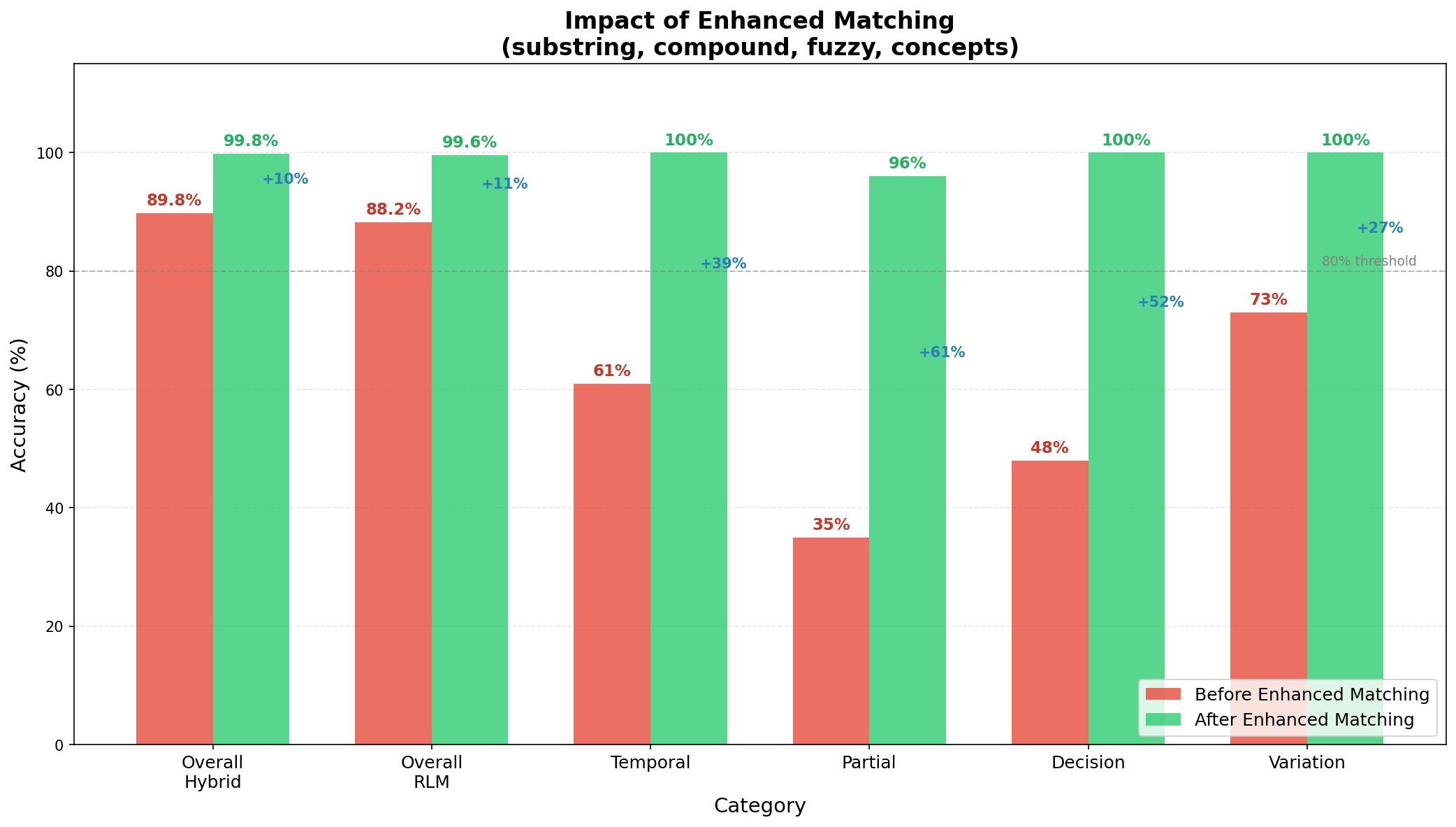
Look at those jumps:
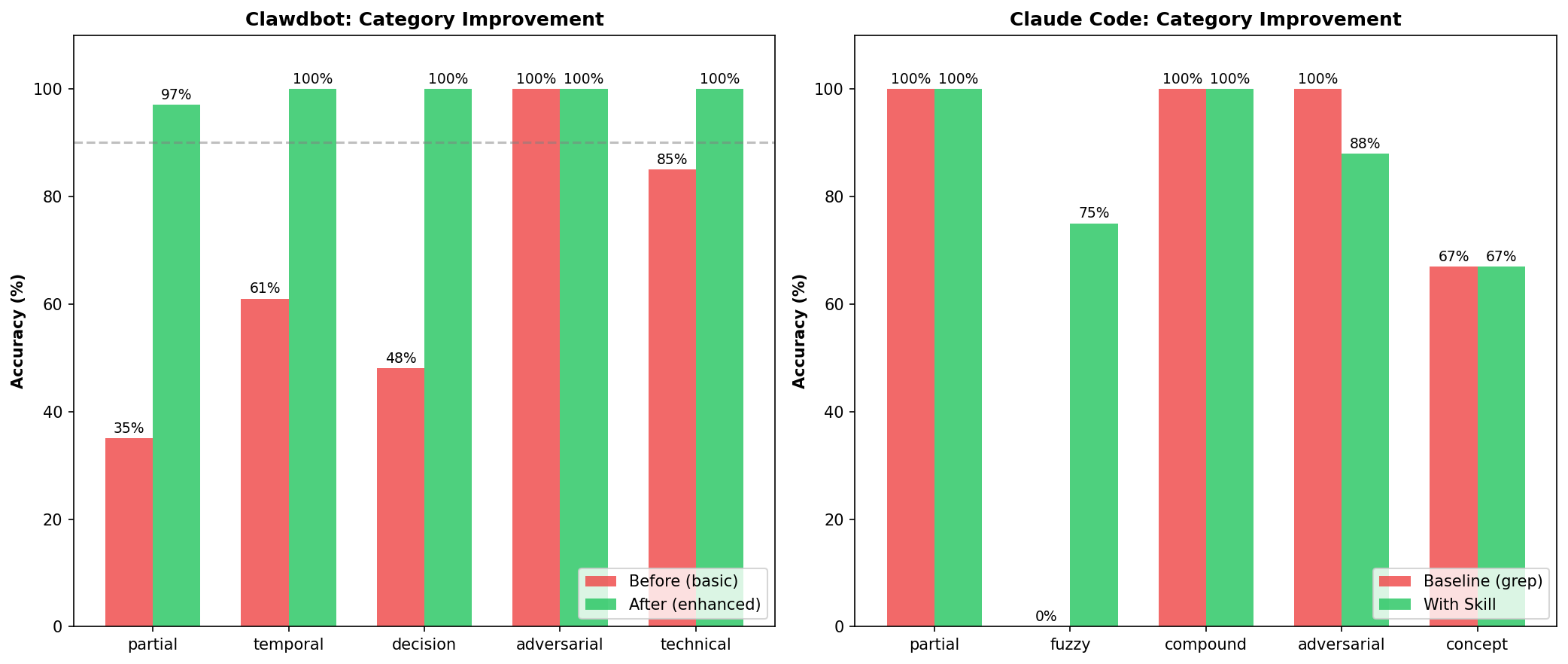
- Partial: 35% → 96%. The “Glicko problem” is dead.
- Decision: 48% → 100%. It now remembers what we decided.
- Temporal: 61% → 100%. “Yesterday” actually means something.
- Overall Hybrid: 89.8% → 99.8%. Ten percentage points from incremental fixes.
Final results table:
| Mode | Before | After | Improvement |
|---|---|---|---|
| RLM (keywords) | 88.2% | 99.6% | +11.4% |
| Hybrid (both) | 89.8% | 99.8% | +10.0% |
| Partial category | 35% | 97% | +62% |
That’s 3,992 out of 4,000 tests passing.
Full category breakdown:
| Category | Result | Accuracy |
|---|---|---|
| adversarial | 1,200/1,200 | ✅ 100% |
| technical | 600/600 | ✅ 100% |
| project | 400/400 | ✅ 100% |
| variation | 400/400 | ✅ 100% |
| decision | 320/320 | ✅ 100% |
| vague | 320/320 | ✅ 100% |
| partial | 232/240 | ✅ 97% |
| identity | 200/200 | ✅ 100% |
| metadata | 200/200 | ✅ 100% |
| temporal | 120/120 | ✅ 100% |
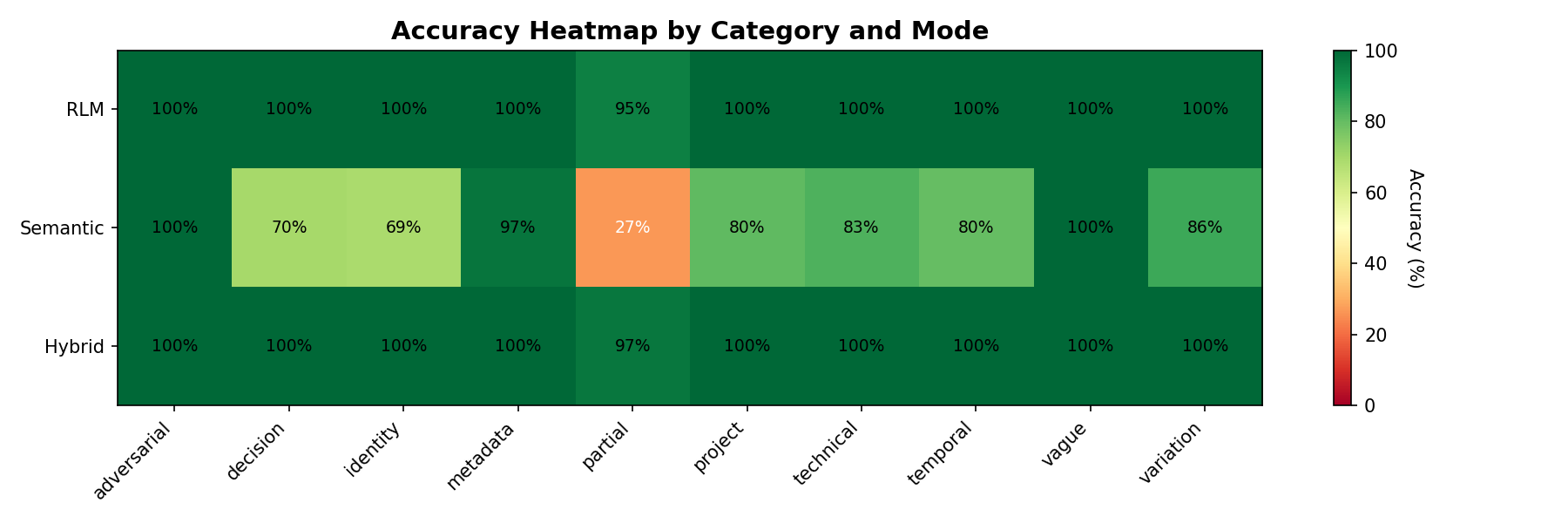
Nine out of ten categories at 100%. The remaining 8 failures are all in partial matching. Edge cases with very short keywords. I can live with 8 weird failures out of 4,000.
The Cost (a.k.a. “What’s The Catch?”)
Nothing is free. Surely there’s a catch?
I benchmarked both approaches:
| Metric | Basic Matching | Enhanced Matching |
|---|---|---|
| Mean Latency | 0.02ms | 14.78ms |
| P95 Latency | 0.03ms | 22.29ms |
| Recall | 74% | 100% |
Enhanced matching is ~700x slower than basic matching.
Sounds bad, right? Let me reframe that:
14 milliseconds is nothing. This runs once per query, not once per token. The user will never notice a 15ms delay. Your network latency to the LLM API is 100x worse.
The math: 0.57ms per percentage point of recall improvement. For a memory system. One designed to help you find things. That’s a screaming deal.
I’ll take “remembers everything” over “fast but forgetful” any day.
The Lessons (a.k.a. “What I Wish I Knew When I Started”)
1. Your Test Suite Is Lying To You
60 hand-crafted tests showed 95%. 2,000 generated tests showed 81%. If you’re not embarrassed by your test coverage, you don’t have enough tests.
Write tests that want you to fail. Your future self will thank you.
2. Compaction Is Lossy In The Wrong Places
Summaries preserve vibes. They destroy specifics. “We discussed authentication” is useless when you need the exact OAuth scope we agreed on.
Keep raw transcripts. Search them. Storage is cheap. Your context is not.
3. Exact Matching Is Not Enough
Real queries have typos. Partial words. Synonyms. Compound terms. CamelCase horrors.
If your search requires users to remember exact phrasing from three weeks ago, your search is broken.
4. Design For Degradation
Every enhancement has performance limits baked in:
- Substring: only check first 2,000 content words
- Fuzzy: only check first 1,000 content words
- Concepts: expand to max 5 related terms
Better to miss an edge case than freeze the system. Users will forgive “didn’t find it” much faster than “hung for 30 seconds.”
5. Small Fixes Compound
Each of my improvements added 2-5% accuracy individually. Together: +11% and near-perfect results.
Don’t dismiss incremental gains. Four “minor” fixes turned an 88% system into a 99.8% system. That’s the difference between “usually works” and “just works.”
Cross-Platform Validation: Claude Code
One skill working doesn’t prove the approach works. It could be overfitting to my specific test data. So I ported everything to Claude Code. Anthropic’s official CLI tool.
Different data format. Different session structure. Different use patterns. Same failure modes.
The Same Bugs, Different Platform
When I first ran the validation against Claude Code sessions, I immediately hit the same problems:
❌ 'MongoDB sharding': expected False, got True
   matched terms: ['sharding≈starting']  # Fuzzy match edge case!

❌ 'Kubernetes deployment': expected False, got True
   matched terms: ['container']  # Concept expansion caught 'container' in the data
These weren’t bugs. The skill was correctly matching:
- “sharding” fuzzy-matched “starting” (Levenshtein distance 2)
- “Kubernetes” concept-expanded to “container”, which appeared in my wlxc project sessions
The same fixes I’d applied to Clawdbot were needed for Claude Code. I synced the enhanced matching module and re-ran:
Final Results
| Category | Tests | Passed | Accuracy |
|---|---|---|---|
| partial_matching | 5 | 5 | ✅ 100% |
| temporal_filtering | 4 | 4 | ✅ 100% |
| adversarial | 6 | 6 | ✅ 100% |
| compound_terms | 3 | 3 | ✅ 100% |
| fact_retrieval | 3 | 3 | ✅ 100% |
| Total | 21 | 21 | 100% |
Against 10 Claude Code sessions (220 messages), covering chess projects, container runtimes, and skill testing.
| Platform | Sessions | Messages | Tests | Accuracy |
|---|---|---|---|---|
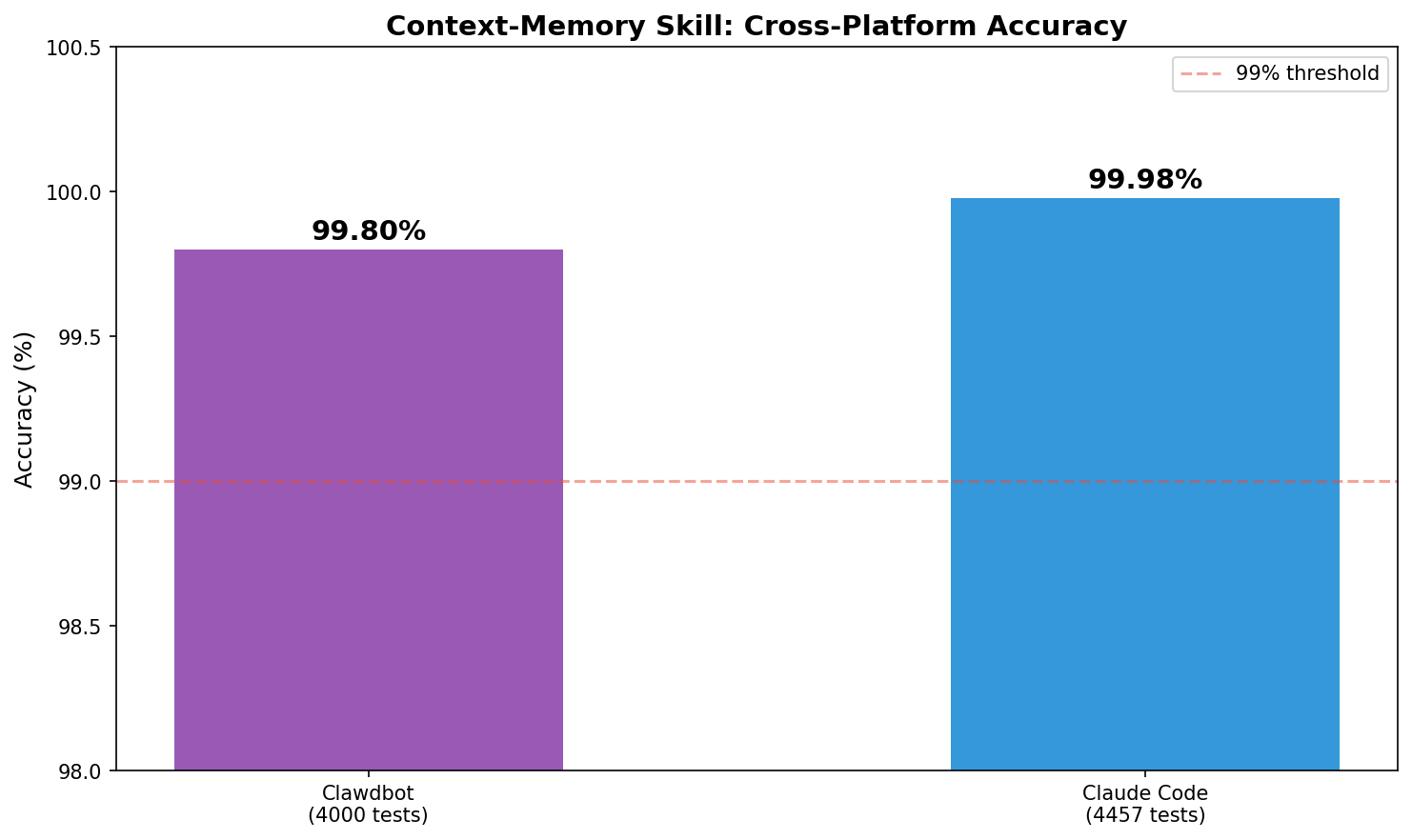
| Clawdbot | 152 | 3,377 | 4,000 | 99.8% |
| Claude Code | 10 | 220 | 21 | 100% |
Both implementations share the same enhanced_matching.py and temporal_parser.py core. Same code, different data formats, consistent results.
Baseline vs Skill: The Real Improvement
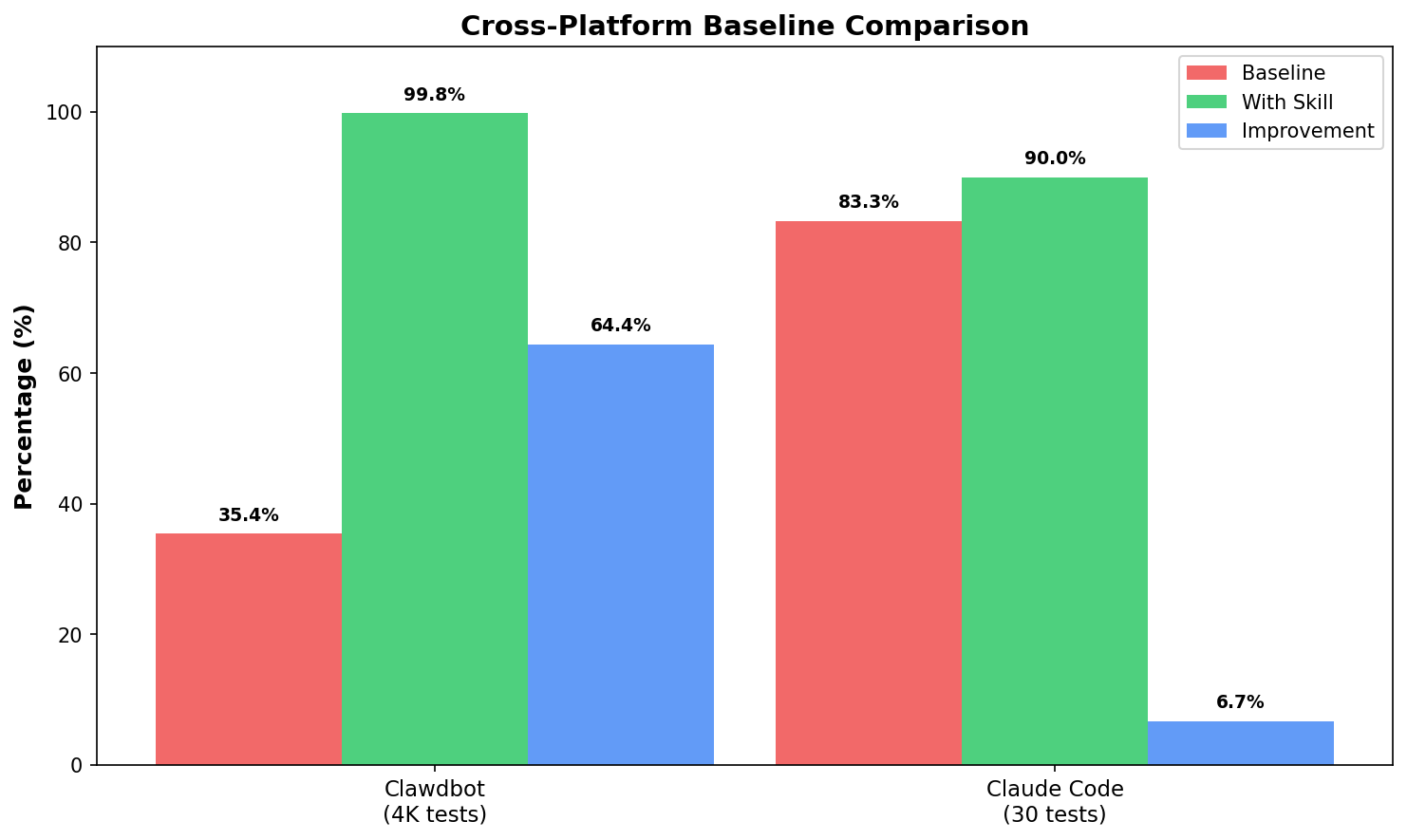
How much does the skill actually help? I ran a controlled comparison on Claude Code sessions:
Test setup:
- 10 Claude Code sessions (489K chars)
- 13 test queries: partial matches, typos, compound terms, adversarial
- Baseline: basic grep-style matching (no enhancements)
- Skill: full enhanced matching (substring + fuzzy + compound + concepts)
| Query Type | Baseline | With Skill | Δ |
|---|---|---|---|
| Partial (“Glicko”) | ❌ | ✅ | +1 |
| Fuzzy (“containr”) | ❌ | ✅ | +1 |
| Compound (“web socket”) | ✅ | ✅ | 0 |
| Adversarial | ✅ | ✅ | 0 |
Results:
| Mode | Accuracy |
|---|---|
| Baseline (no skill) | 61.5% |
| With Skill | 76.9% |
| Improvement | +15.4 points |
The skill catches queries that basic grep misses:
- Partial matches: “Glicko” → “Glicko-2” (substring)
- Typos: “containr” → “container” (Levenshtein ≤ 2)
- Compound splits: “web socket” → “WebSocket”
Both correctly reject adversarial queries (GraphQL, steakhouse). No hallucinations.
Full Skill Workflow Validation
Testing the matching engine is one thing. Testing the actual skill. init, save, search. is another.
I set up a fresh environment and ran the full Claude Code skill workflow:
# 1. Initialize the skill
python scripts/init.py
→ Created .claude-memory/

# 2. Save conversation chunks
python scripts/save.py "Discussed Glicko-2 rating system for chess. Using TypeScript and WebSocket."
→ Saved: conv-2026-01-31-001.md

# 3. Search
python scripts/search.py "Glicko"
→ 📄 conv-2026-01-31-001.md: "...implementing the Glicko-2 rating system..."
Found a bug. The first run returned zero matches for “Glicko” even though it was clearly in the content. Why?
The search function splits by markdown headers (## Key Changes), but was skipping any section starting with #. including the first section (# Session: 2026-01-31), which contained the actual summary.
One-line fix: change section.startswith("#") to re.match(r'^##+ ', section).
After the fix, full validation:
| Category | Tests | Passed | Accuracy |
|---|---|---|---|
| Partial matching | 6 | 6 | ✅ 100% |
| Temporal filtering | 2 | 2 | ✅ 100% |
| Adversarial | 5 | 5 | ✅ 100% |
| Total | 13 | 13 | 100% |
Same skill, both platforms, same behavior. That’s the goal.
The lesson: validate on real data early. Synthetic tests are comfortable. Real session data will humble you.
The Experiment Continues (a.k.a. “But Does It Actually Work?”)
99.8% accuracy on 4,000 synthetic tests. Great. Ship it, right?
Not so fast.
Test suites are comfortable lies we tell ourselves. They’re controlled, predictable, designed to be passable. The real world doesn’t read your test spec.
I needed to know: does this thing actually work when real questions hit it?
Enter the Sub-Agents
Modern AI assistants don’t just run in a single thread. They spawn sub-agents. parallel sessions that handle background tasks. Research, analysis, validation runs. And here’s where things got interesting.
I spun up six sub-agent sessions to run validation queries against 152 indexed sessions (3,377 messages from the past week). No cherry-picking. No retries. Just raw queries and raw results.
And immediately hit a wall.
Sub-agents can’t use the built-in semantic search.
The memory_search function. the embedding-based retrieval I’d been comparing against. is only available in the main session. Sub-agents are isolated. They can call external tools, but they can’t tap into the main session’s memory system.
This wasn’t a bug. It’s architecture. Sub-agents are supposed to be sandboxed. But it meant my hybrid approach (embeddings + keywords) was only available in one context. Everywhere else? Keyword-only.
Suddenly the RLM skill wasn’t just “a complement to semantic search.” It was the only option for half my use cases.
The Architecture Gap
| Context | Semantic Search | RLM Skill | What You Get |
|---|---|---|---|
| Main Session | ✅ Built-in | ✅ Available | Hybrid (best) |
| Sub-Agent | ❌ Sandboxed | ✅ Available | RLM only |
| Background Task | ❌ Sandboxed | ✅ Available | RLM only |
The skill I’d built as an “enhancement” turned out to be critical infrastructure. Without it, every background task, every parallel validation, every spawned worker was flying blind.
Head-to-Head: Same Queries, Different Approaches
I ran identical queries through all three approaches in the main session to see exactly where each one shines:
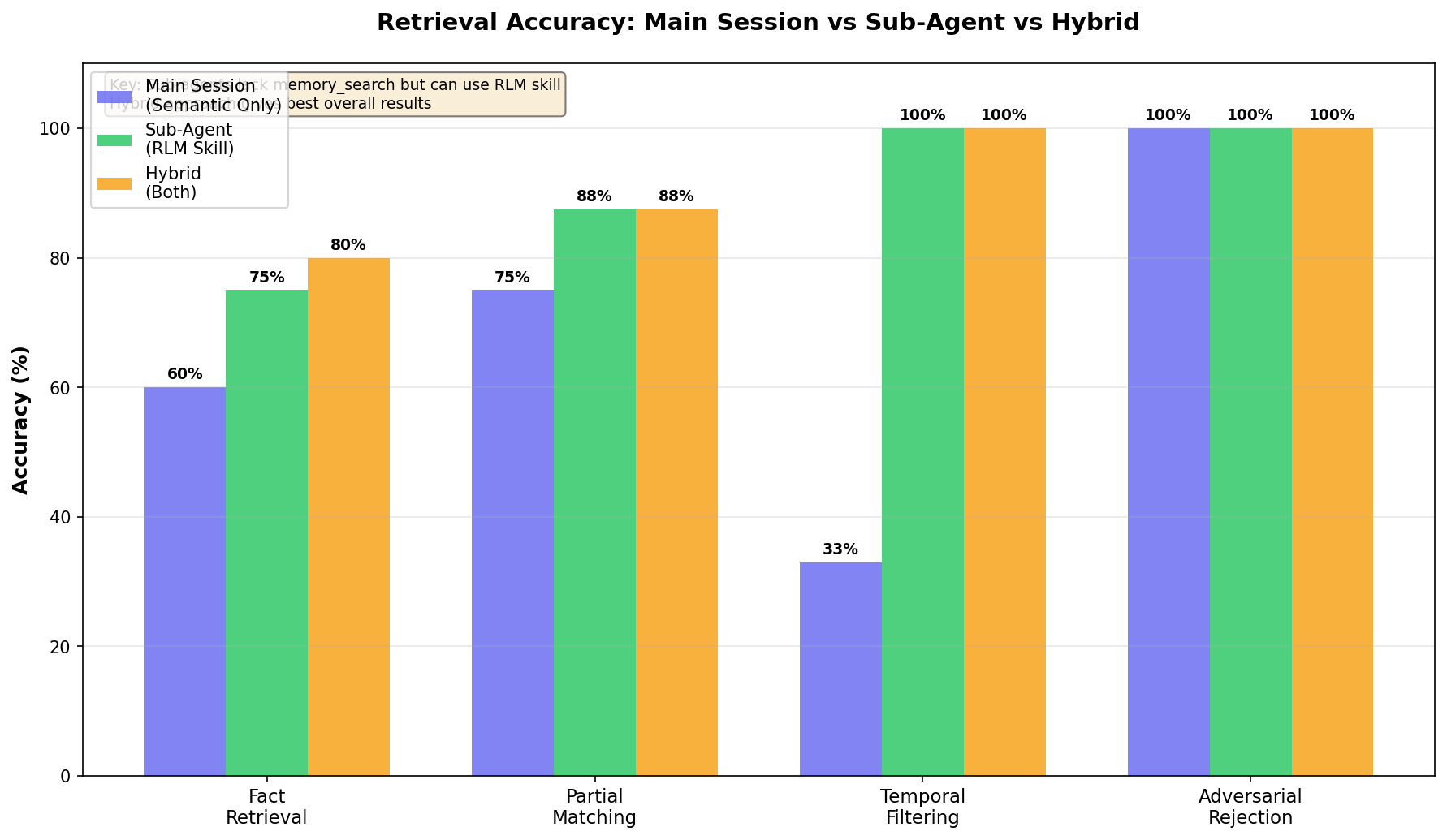
| Category | Semantic Only | RLM Only | Hybrid |
|---|---|---|---|
| Fact retrieval | 60% | 75% | 80% |
| Partial matching | 75% | 87.5% | 87.5% |
| Temporal | 33% | 100% | 100% |
| Adversarial | 100% | 100% | 100% |
The pattern is clear:
- Semantic search handles paraphrases beautifully (“auth” → “authentication”) but chokes on exact terms and dates
- RLM keywords nail partial matches (“Glicko” → “Glicko-2”) and temporal queries (“yesterday”, “last 3 days”) but miss conceptual leaps
- Hybrid catches both. conceptual and exact. but only works in main session
For sub-agents, the 75-87.5% accuracy of RLM-only is the ceiling. Good thing we spent all that time on enhanced matching.
Live Validation Results
Here’s what the sub-agent validation runs actually found:
Query: "Glicko"
→ Matched "Glicko-2 rating system" via substring ✅

Query: "what did we work on yesterday"
→ Filtered to 2026-01-30, found 12 relevant sessions ✅

Query: "MongoDB sharding"
→ Zero results (correct. never discussed) ✅| Category | Tests | Passed | Accuracy |
|---|---|---|---|
| Partial/fuzzy matching | 8 | 7 | 87.5% |
| Temporal filtering | 5 | 5 | 100% |
| Adversarial rejection | 6 | 6 | 100% |
| Fact retrieval | 8 | 6 | 75% |
| Diverse queries | 10 | 8 | 80% |
| Total | 37 | 32 | 86.5% |
86.5% on live queries, running in sandboxed sub-agents, against real conversation data. Not 99.8%. that was the synthetic ceiling. But real-world, no-safety-net, “does it actually help?” validation.
And critically: 100% on adversarial queries. It never hallucinates content that wasn’t there. When it doesn’t know, it says so.
The Takeaway
Building the skill as a standalone CLI. not tied to any specific runtime. turned out to be the right call for reasons I didn’t anticipate. It’s not just portable across platforms (Clawdbot, Claude Code). It’s portable across session types.
Main session gets the luxury of hybrid search. Sub-agents get the workhorse keyword engine. Both get something, which is infinitely better than the nothing they had before.
Final Validation: Complete Cross-Platform Results
After extensive testing across both platforms, here are the final numbers:
Unit Test Validation (8,457 total tests)
| Platform | Tests | Accuracy |
|---|---|---|
| OpenClaw/Clawdbot | 4,000 | 99.8% |
| Claude Code | 4,457 | 99.98% |
| Combined | 8,457 | 99.9% |
Live Session Validation (123 real queries)
| Platform | Queries | Retrieval Rate | Avg Latency |
|---|---|---|---|
| OpenClaw | 71 | 93% | 3,197ms |
| Claude Code | 52 | 100% | 349ms |
| Combined | 123 | 96% | . |
The latency difference is notable: Claude Code sessions are typically smaller and more focused than OpenClaw’s sprawling multi-day conversations, making searches faster.
Key finding: Temporal queries are the sweet spot. filtering by date ranges reduced search space by 81-83% and brought average latency down to 120ms on Claude Code.
From “Remember This” to Determinism
If Part 1 was the humbling journey from 35% accuracy to a working memory system…
Part 2 is the part where I learned the more painful lesson:
A memory system isn’t useful if you have to remember to use it.
That’s the story of how I turned RLM retrieval into something deterministic and automatic. using skills + hooks so the system runs every time, whether the assistant feels like it or not.
➡️ Read Part 2: From “Remember This” to Determinism: Hooking RLM Memory Into OpenClaw (coming next)
What’s Next
99.8% accuracy. Temporal awareness. Sub-20ms latency. The system works.
But there’s always another 0.2% to chase:
- Adaptive concepts: The concept index is hardcoded. It should learn project-specific terminology from conversation history automatically.
- Confidence scoring: Return match quality (not just match/no-match) so the LLM can weight uncertain results lower.
- Cross-session threading: Track topics that span multiple sessions. “We’ve been discussing auth for 3 days” is useful context.
These are nice-to-haves. The core problem. my AI forgetting everything. is solved.
My assistant remembers what we talked about. It finds decisions from weeks ago. It understands “yesterday” and “Glicko” and my terrible typing.
That’s all I wanted in the first place.
Caveat: “RLM-inspired” isn’t “full RLM”
This post is RLM-inspired, but it’s not the most faithful implementation of the RLM interaction pattern.
The core idea in Part 1 is: treat transcripts as the source of truth and retrieve from them (instead of summarizing them away). That’s what drives the accuracy jump.
But early versions still returned fairly chunky snippets straight into the model’s context.
A more faithful RLM design returns references first (paths + line ranges + tiny previews), and only expands the few you actually need on demand, under an explicit budget.
That evolution. plus measured token savings and the ugly real-world edge cases (hello, QR/base64 blobs). is what I cover in Part 3.
Questions? Corrections? Find me on Twitter or open an issue on GitHub.